Reference · client
Six cards on the wall, six slots on the bar.
Every number the start screen prints, read at one moment: player counts, update badges, and the two pagers.
The start screen on 9 Nov 2026. Player counts are the numbers printed on the cards at that moment; they move.
The Miniblox start screen is a wall of mode cards above a six-item bar. Everything a new player needs to decide sits on those cards: the mode, whether it was updated, and how many people are inside right now.
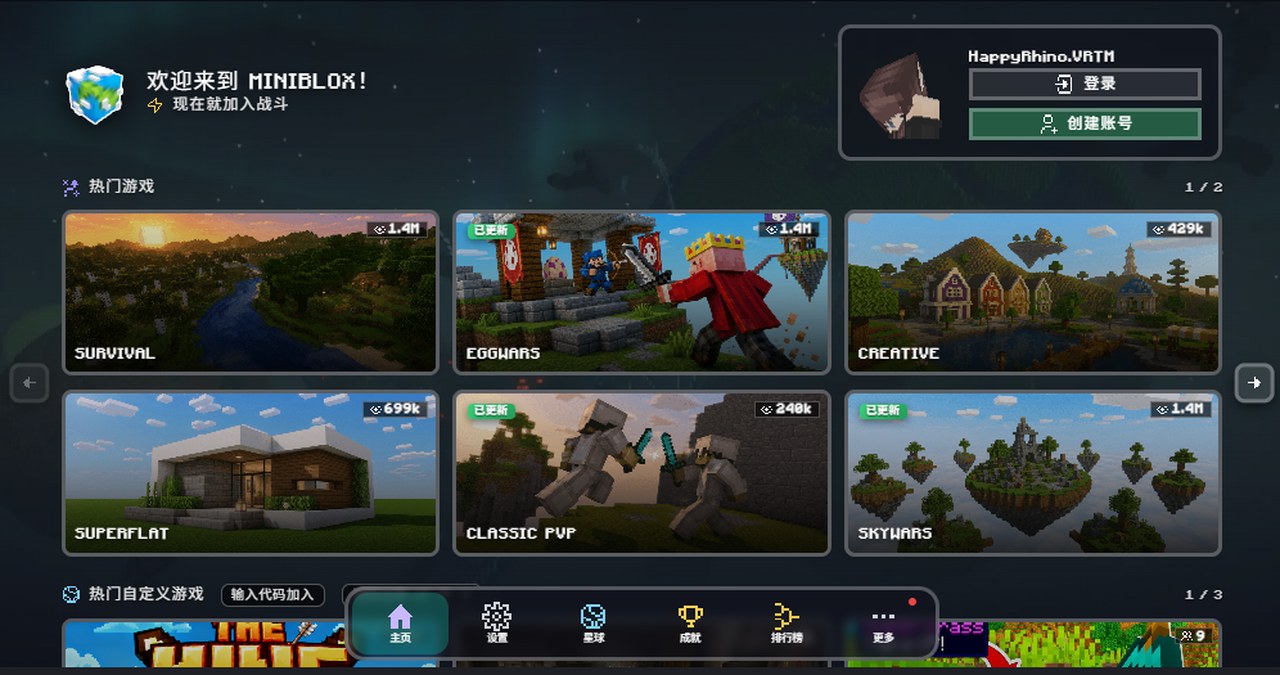
The six cards on the first page
| Card | Players shown | Updated badge |
|---|---|---|
| SURVIVAL | 1.4M | no |
| EGGWARS | 1.4M | yes |
| CREATIVE | 429k | no |
| SUPERFLAT | 699k | no |
| CLASSIC PVP | 240k | yes |
| SKYWARS | 1.4M | yes |
The counter in the corner of each card is followed by a small icon; the numbers above are read exactly as printed (1.4M, 429k, and so on). Three cards carry an update badge, which on this screen is a small tag next to the title rather than a separate row.
Two pages, six at a time
The block is paged: 1 / 2 in the top-right corner with arrows on both sides. So the start screen shows six of the twelve headline modes at a time. The custom-game strip below it is paged separately, 1 / 3, and carries its own join-by-code field.
The bottom bar
| Slot | Chinese label | English |
|---|---|---|
| 1 | 主页 | Home |
| 2 | 设置 | Settings |
| 3 | (planet icon) | no readable label at this size |
| 4 | 成就 | Achievements |
| 5 | 排行榜 | Leaderboard |
| 6 | 更多 | More |
The account panel sits top right with two buttons, login and create account, and a placeholder name. Nothing was signed in during our session, so every page here is written from the guest side.
Still open
- What the third navigation slot opens.
- Whether the counters include custom-game players.
- What the update badge actually changes.