Reference · client
The language switch is in settings, not on the start screen.
Our client booted in Simplified Chinese and nothing on the start screen offered a way out. The tab that fixes it is here.
Read off the client on 9 Nov 2026, in the Language tab. The interface itself was in Simplified Chinese during the capture.
Miniblox ships with a language tab, and on our machine the client had already chosen Simplified Chinese before we touched anything. The switch is here, not on the start screen.
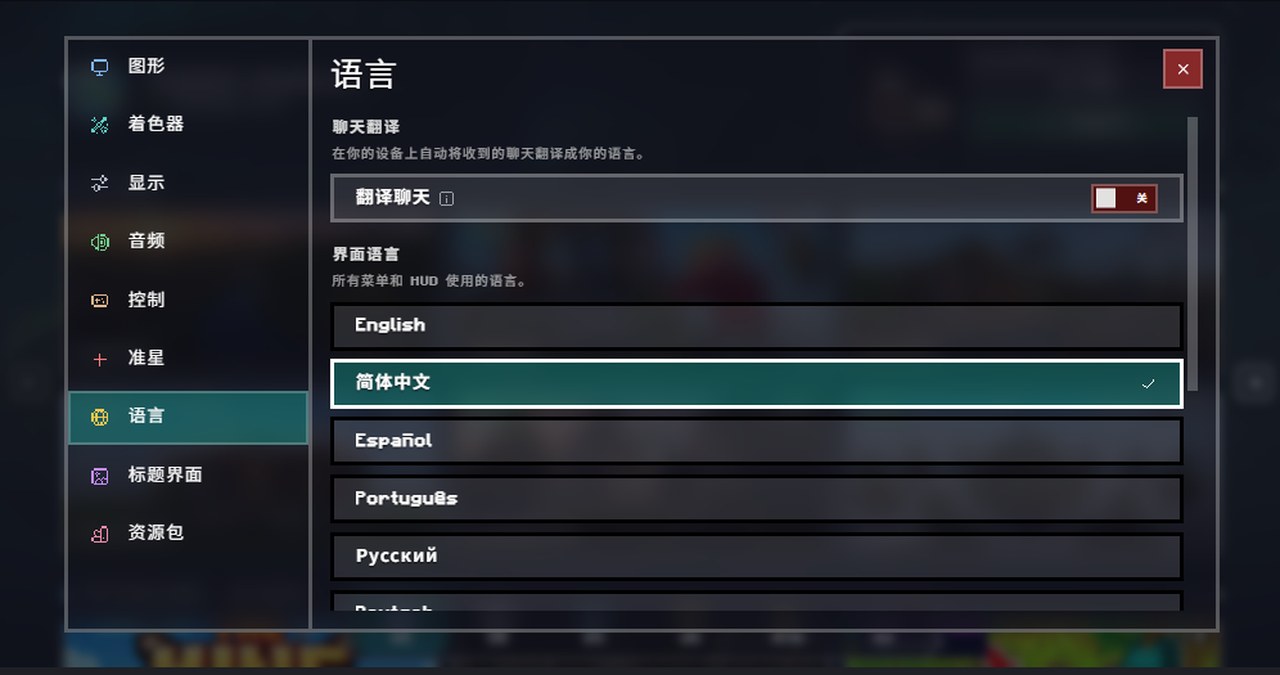
Chat translation
The first block, chat translation (聊天翻译), is a single switch, off in our session. The line under it says received chat is translated into your language automatically, on your device. That is the client's own wording, not a test result — we did not have a second player to write to us.
Interface language
The second block, interface language (界面语言), carries the line that every menu and the HUD use this setting. The list we could see, top to bottom:
| Position | Label as printed | State |
|---|---|---|
| 1 | English | available |
| 2 | 简体中文 (Simplified Chinese) | selected (tick on the right) |
| 3 | Español | available |
| 4 | Português | available |
| 5 | Русский | available |
| 6 | (cut off at the fold) | the list scrolls |
Two things follow from this screen. First, a reader who wants English has to come here once — nothing on the start screen offers it. Second, Spanish and Portuguese are both real options in the client, which matters for a guide published in those languages.
Still open
- Whether the change applies instantly or after a reload.
- Whether the choice is stored per account or per browser.
- Whether chat translation works, and what it does to names and numbers.