Reference · client
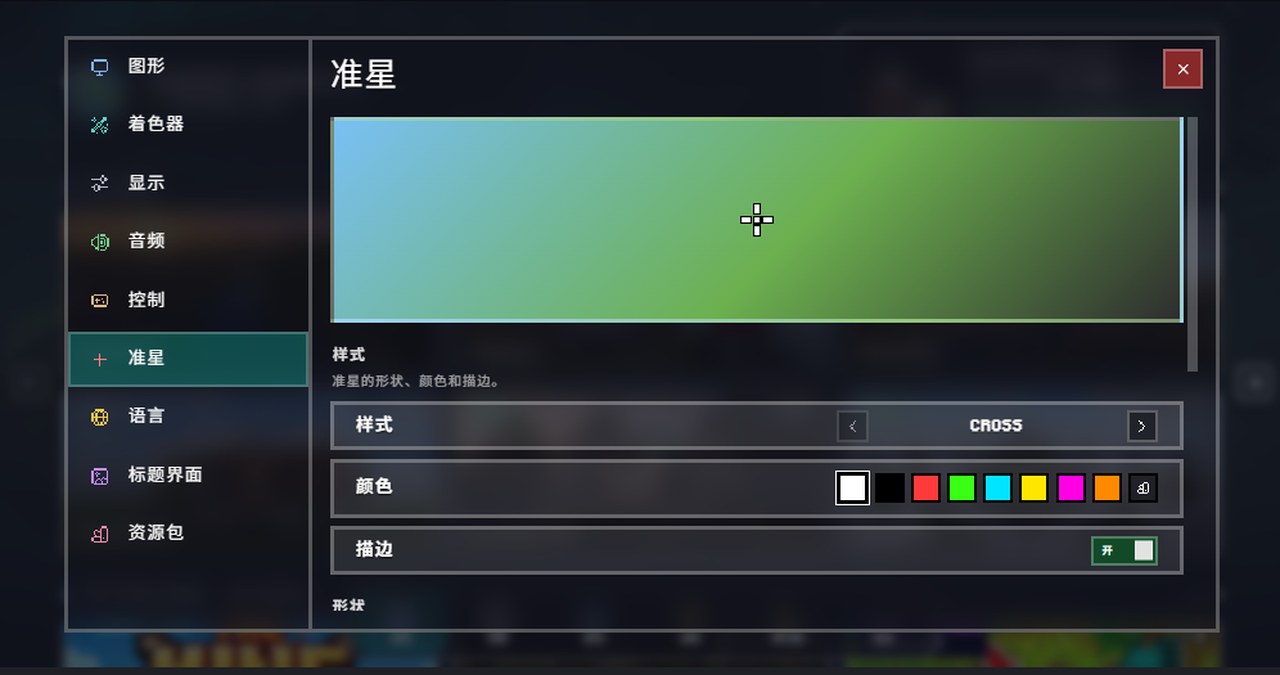
The crosshair tab, with a preview you can judge against green.
Style, colour and outline, drawn on a green-to-blue field so a bad colour is obvious before a match.
Read off the client on 9 Nov 2026, in the Crosshair tab. The interface was in Simplified Chinese; labels are translated here.
The crosshair tab is the one place where a shooter setting is fully visible before a match: style, colour and outline, with a live preview at the top.
The preview
The top half of the panel is a gradient field with the crosshair drawn in the middle. It updates as the rows below change, so you can judge a colour against a green-to-blue background before a match — which is exactly the background where a green crosshair disappears.
The three rows we saw
| Row | Value in our session | Control |
|---|---|---|
| 样式 (style) | CROSS, with left and right arrows | stepper |
| 颜色 (colour) | eight swatches plus a custom picker | swatch row |
| 描边 (outline) | on | switch |
There is a fourth block, shape (形状), below the fold of the screenshot; we did not read it. The style arrows suggest a fixed list rather than free drawing, but the number of styles is not printed anywhere we could see.
Still open
- How many styles the stepper cycles through.
- Whether the custom colour accepts a hex value.
- What the shape block changes.